Skip to content
Talvera Bite · Restaurant POS for Android
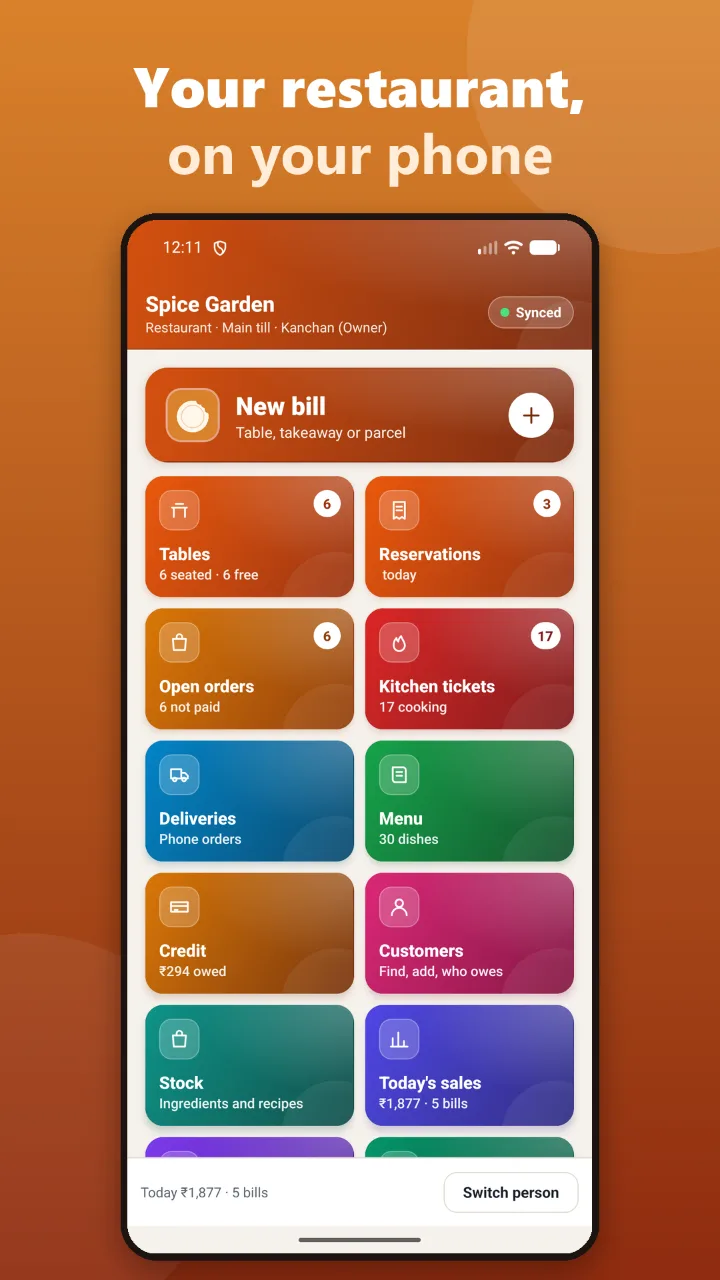
Your restaurant, on your phone

Tables, KOTs, GST bills, UPI and WhatsApp bills — all from the phone in your pocket. No PC, no billing machine, no setup visit. Open the app, verify your number and bill your first table in three minutes.

Android · Free for 7 days · For restaurants, cafés, dhabas, cloud kitchens and canteens

Talvera Bite home screen: New bill button, tables seated and free, reservations, open orders, kitchen tickets, deliveries, menu, credit, customers, stock and today’s sales
to your first bill
3 min
to your first bill
PCs or billing machines
0
PCs or billing machines
free, every feature
7 days
free, every feature
bills with no internet
Offline
bills with no internet

See it working

From seating a table to closing the day

Real screens from the app, the same ones on our Google Play listing — a restaurant with an AC hall, a tandoor and a busy lunch.

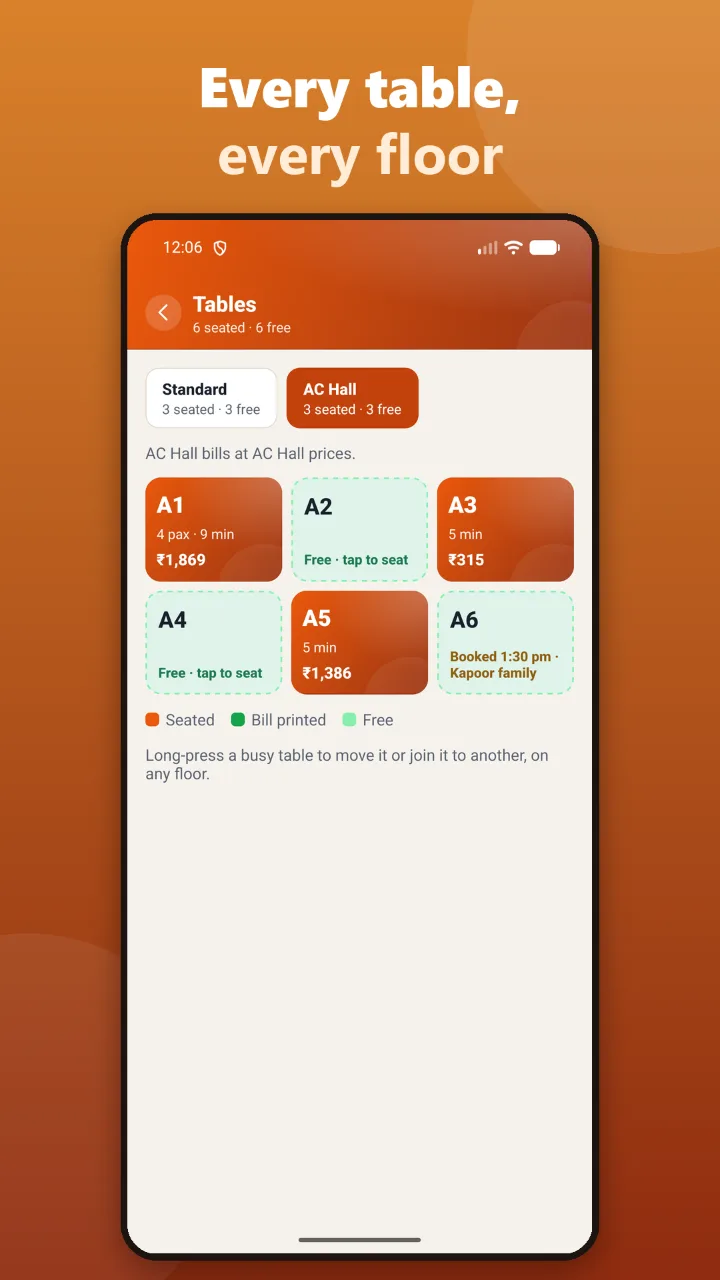
Talvera Bite tables screen: Standard and AC Hall floors, tables seated with minutes and running amount, free tables and a table booked for 1:30 pm

Tables

Every table, every floor

Floors get their own tabs and table names: A1, A2 in the AC hall, S1, S2 in standard. Each busy table shows guests, minutes seated and the running amount.

  • AC hall bills at AC hall prices, on its own
  • Seated, bill printed and free, at a glance
  • Booked tables show the time and the guest’s name
  • Long-press to move a table or join it to another, on any floor
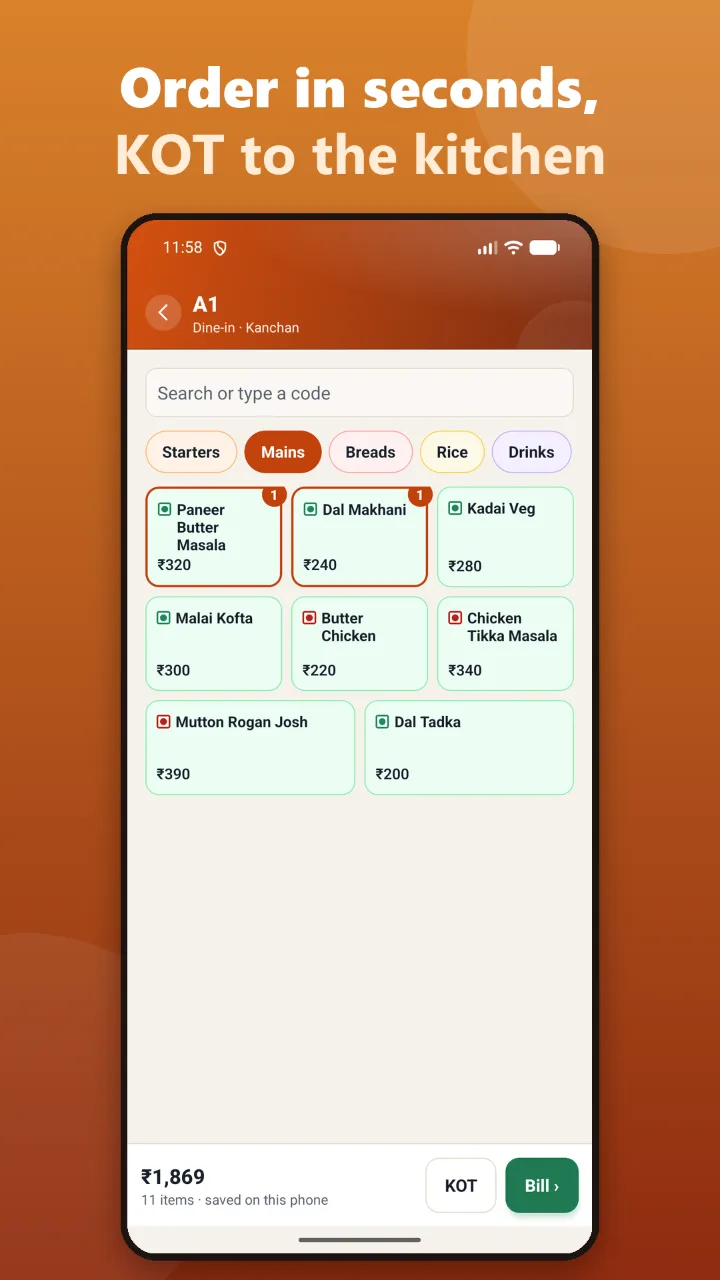
Talvera Bite order screen for table A1: menu categories, veg and non-veg dishes with prices, the running total and KOT and Bill buttons

Order and KOT

Take the order in seconds, send the KOT

Search a dish or type its code, or tap through Starters, Mains, Breads and Drinks. Veg and non-veg marks on every dish. One tap sends the KOT to the kitchen.

  • Search by name or short code
  • Veg and non-veg marks
  • The order is saved on the phone as you go
  • KOT goes to the right kitchen station
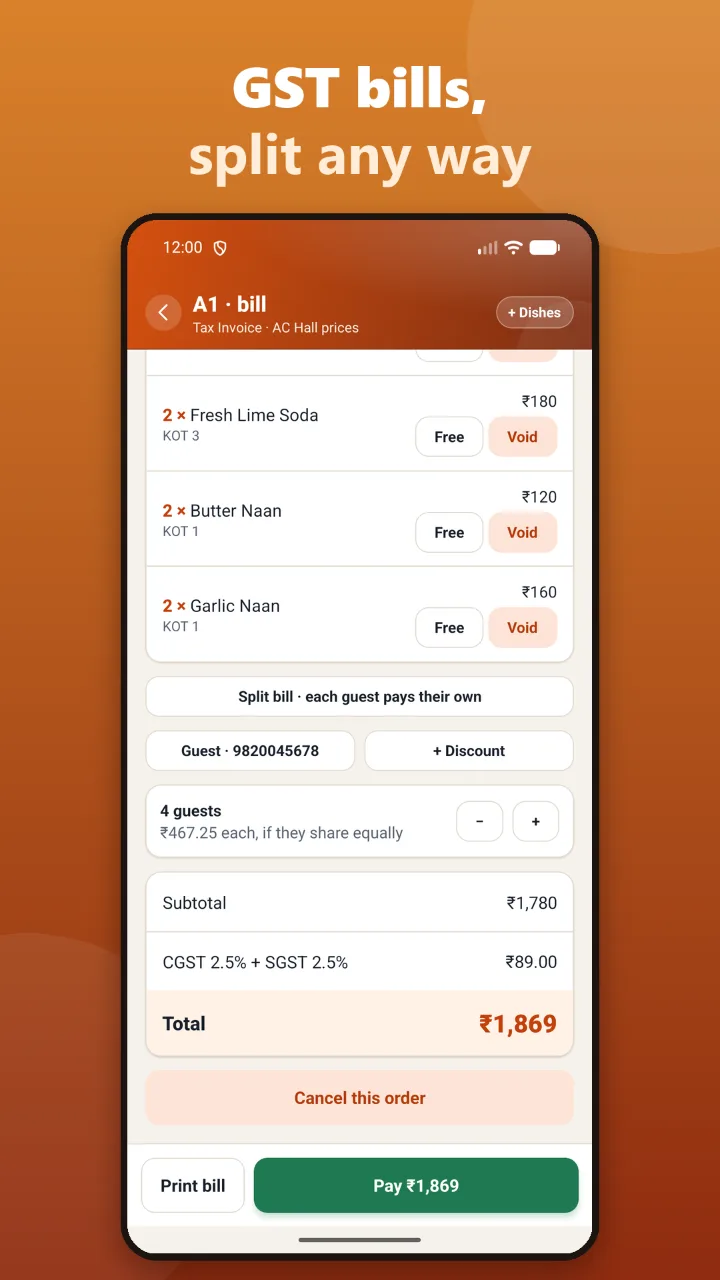
Talvera Bite bill for table A1: dishes by KOT with Free and Void buttons, split bill, guest mobile, discount, amount per guest, CGST and SGST and the total

GST bill

GST bills, split any way

CGST and SGST worked out for you, at the floor’s prices. Split the bill so each guest pays their own, or see what each pays if they share equally.

  • CGST + SGST on a tax invoice, or composition scheme
  • Mark a dish free or void it; every cancellation records who and why
  • Discount with a reason
  • Number of guests and the amount per head
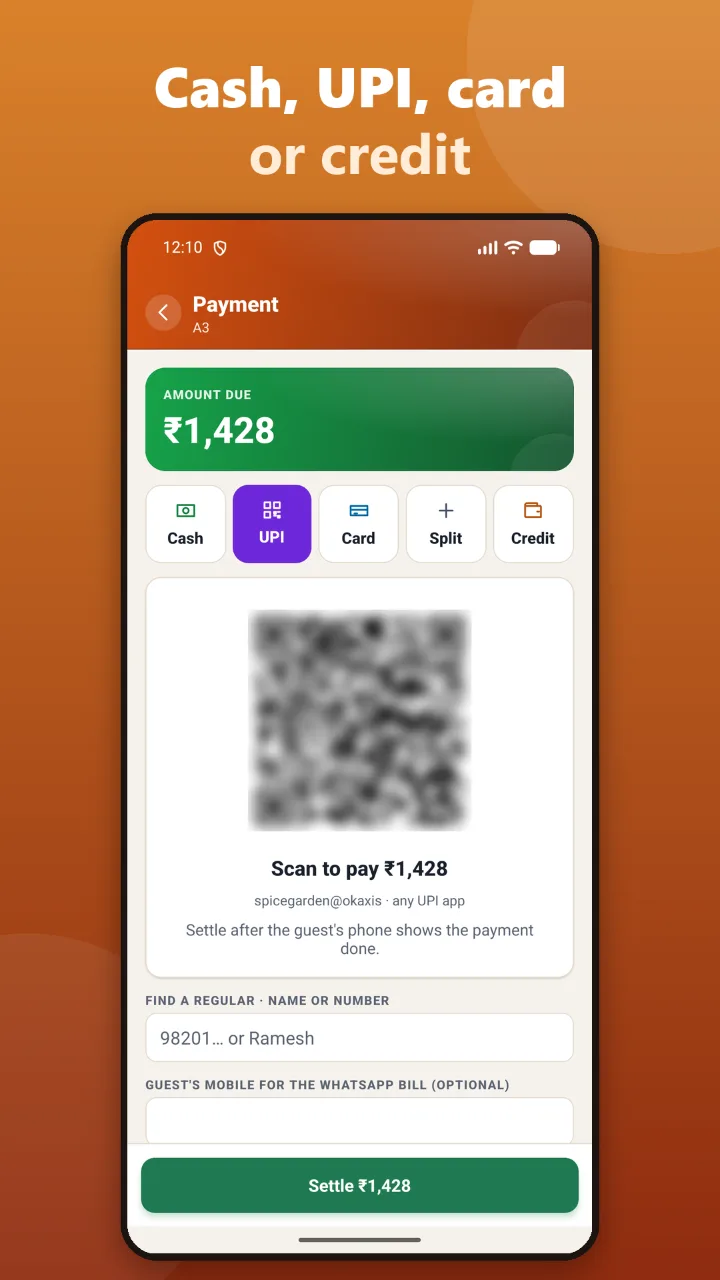
Talvera Bite payment screen: amount due, cash, UPI, card, split and credit, a UPI QR for the exact amount and the guest’s mobile for a WhatsApp bill

Payment

Cash, UPI, card or credit

Show a UPI QR for the exact amount and settle once the guest’s phone says paid. Split between cash and UPI, or put it on a regular’s credit.

  • UPI QR with the exact amount, any UPI app
  • Split payment and credit (khata)
  • Find a regular by name or number
  • Send the bill as a PDF on WhatsApp — no paper needed
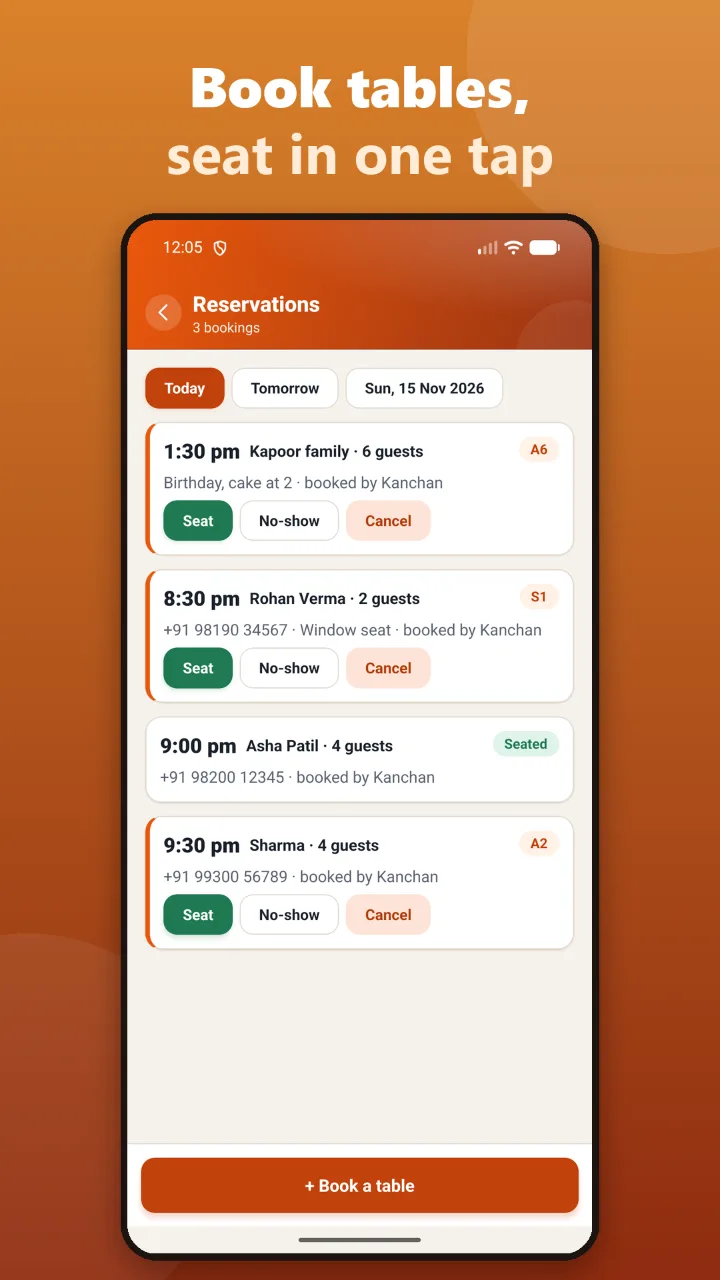
Talvera Bite reservations screen: bookings for today with time, guest name, guests, table and notes, and Seat, No-show and Cancel buttons

Reservations

Book tables, seat them in one tap

Take a booking for a time and number of guests, with a note like “birthday, cake at 2”. When they arrive, tap Seat and the table opens.

  • Today, tomorrow or any date
  • Booked tables show on the floor
  • Seat, no-show or cancel
  • Double bookings are refused
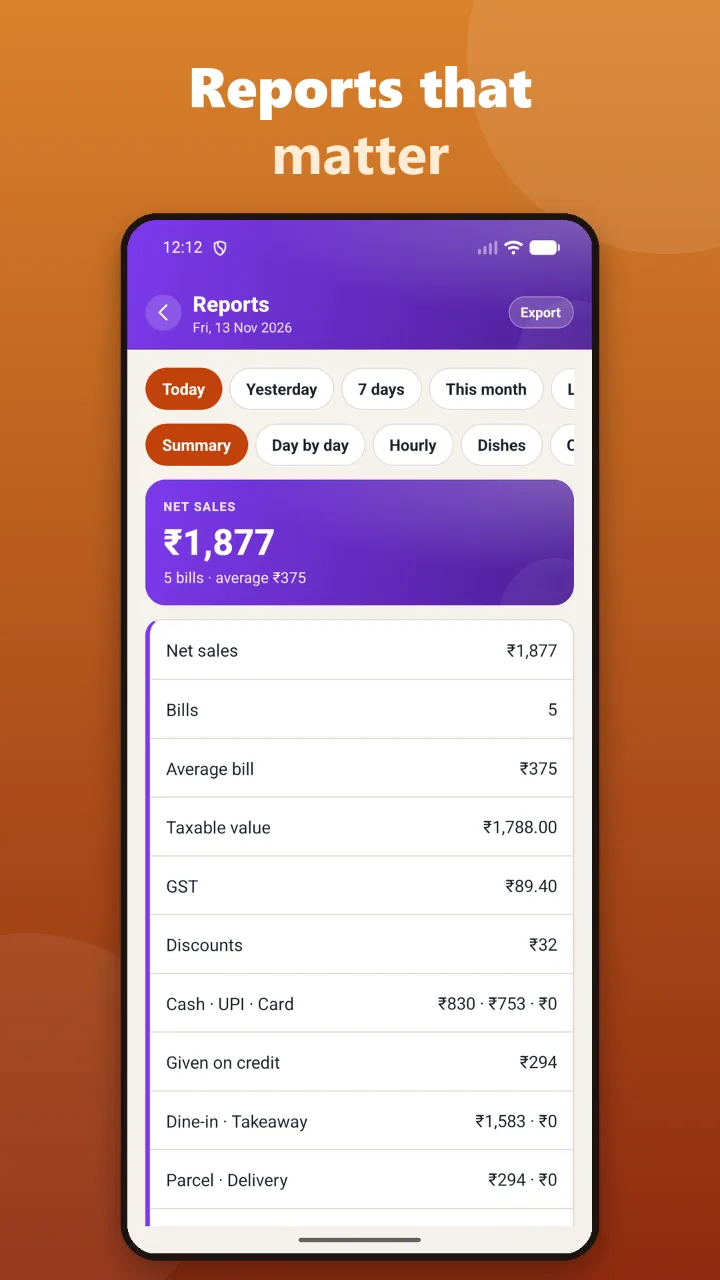
Talvera Bite reports screen: net sales, bills, average bill, taxable value, GST, discounts, cash UPI and card, credit, dine-in, takeaway, parcel and delivery

Reports

Reports that matter

Today, yesterday, 7 days, this month or last month. Net sales, GST, discounts and how the money came in, then by day, hour, dish, category, staff and floor.

  • Cash, UPI and card, and what went on credit
  • Dine-in, takeaway, parcel and delivery
  • GST summary, discounts, cancellations, kitchen speed
  • Export any report as CSV for your accountant
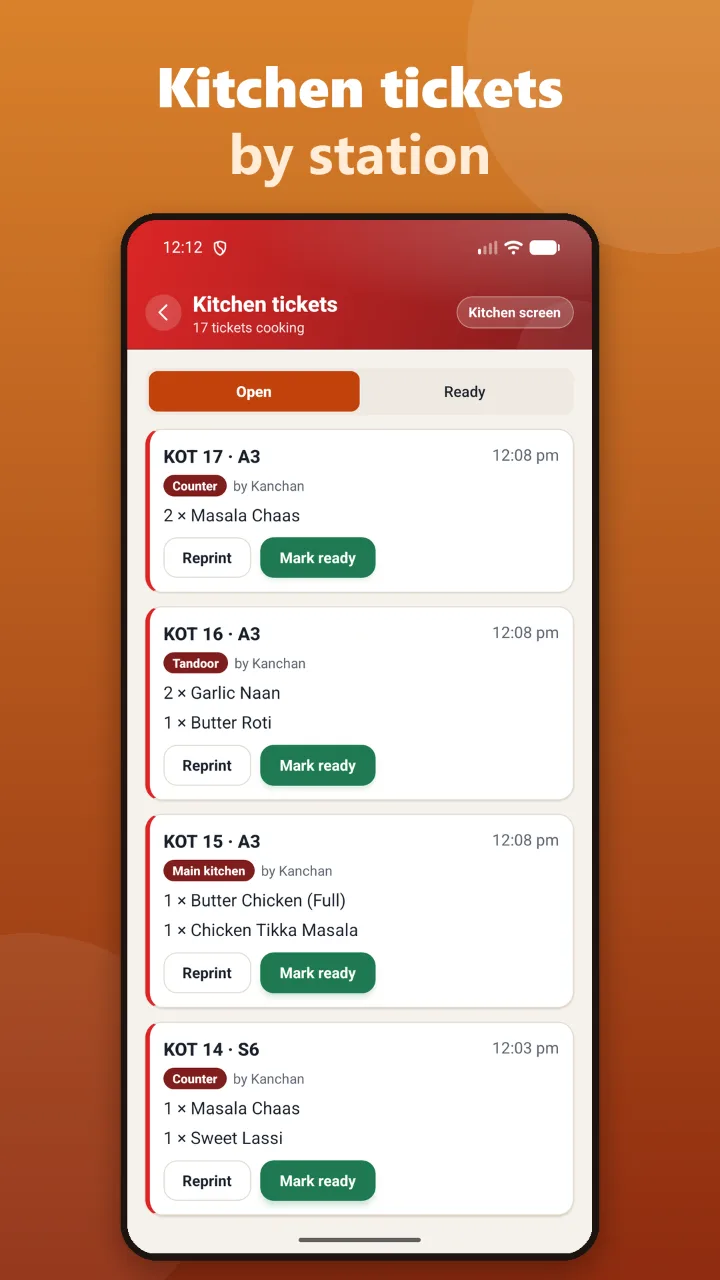
Talvera Bite kitchen tickets screen: open KOTs by table and station — counter, tandoor, main kitchen — with Reprint and Mark ready buttons

Kitchen

Kitchen tickets by station

Each KOT goes to its station: tandoor, Chinese, main kitchen, counter. Mark it ready when it is, or open the full kitchen screen on a spare phone or tablet.

  • Tickets by table, station and who took the order
  • Reprint or mark ready
  • A full kitchen screen, oldest ticket first
  • Kitchen speed in reports

Everything in the box

A full restaurant POS, without the hardware

No PC, no billing machine

Open the app, verify your number and bill your first table in about three minutes. No setup visit.

Tables and KOT

Floors, tables, KOTs by station, move and join tables, split bills, guests and amount per head.

GST done right

CGST + SGST, prices with or without tax, composition scheme, and GSTIN checked before it is saved.

Price lists

AC hall rates, takeaway rates and Swiggy / Zomato rates, each applied on its own. Service and packing charge on the orders you choose.

Payments and credit

Cash, UPI QR with the exact amount, card, split payment and credit, with a customer book of who owes what.

WhatsApp bills

Send the bill as a PDF on WhatsApp from Talvera’s number, or print on a Bluetooth thermal printer.

Staff with their own PIN

Waiters take orders on their own phones; only the owner and cashier take payment. Day close counts the cash.

Stock and recipes

Ingredients and recipes so every dish knows what it costs you, with a warning when food cost is too high.

Menu engineering

Your stars, your plough-horses and the dishes to drop, alongside sales by dish, hour, staff and floor.

Works offline

Bill with no internet. Everything uploads when you are back online, and bill numbers never repeat.

Safe in the cloud

Lost or changed your phone? Verify your number and restore every bill, customer, staff member and setting.

Every change recorded

Discounts with a reason, items given free, every cancellation with who and why.

Start billing in three steps

  1. 1

    Install Talvera Bite

    On any Android phone, from Google Play.

  2. 2

    Verify your number

    Choose Restaurant, enter your mobile number and the SMS code.

  3. 3

    Set up in minutes

    Restaurant name, tables and a 4-digit PIN. A sample menu is ready to bill from.

Questions restaurant owners ask

What is Talvera Bite?

Talvera Bite is restaurant billing that runs on an Android phone: tables, KOTs to the kitchen, GST bills, payments, WhatsApp bills, reservations, stock and reports. You do not need a PC or a billing machine.

Do I need a computer or a billing machine?

No. Bite runs on the phone. If you want paper bills, pair a Bluetooth thermal printer in Android settings and Bite prints to it. Or send the bill on WhatsApp and skip paper altogether.

Does it work without internet?

Yes. You can bill with no internet. Bills, customers and changes upload when the phone is back online, and your bill numbers carry on without repeating.

What happens if I lose or change my phone?

Install Bite on the new phone, verify your mobile number and tap Restore my shop. Every bill, customer, staff member and setting comes back from the cloud.

Can my waiters take orders on their own phones?

Yes. Add waiter phones from the main till with a 6-digit code. Waiters take orders and send KOTs; only the owner and cashier take payment. A spare phone or tablet can show the full kitchen screen.

Does it handle Swiggy and Zomato orders?

Yes. Enter a Swiggy or Zomato order with its number from the platform’s tablet, then the dishes as usual. Those orders can use their own price list, and reports show what was paid on the platforms.

Is GST worked out correctly?

Yes. Bite works out CGST and SGST per bill, handles prices with or without tax and the composition scheme, and checks a GSTIN before it is saved. Liquor is billed separately with state VAT.

How much does Talvera Bite cost?

Every feature is free for 7 days. After that, activate a paid plan with the Talvera team on WhatsApp at +91 90041 87595. There are no per-bill fees.

Is it available on iPhone?

Not at the moment. Talvera Bite is for Android phones.

Where is my data kept?

On your phone, and backed up to Talvera’s cloud in India so you can restore it on a new phone. See the Talvera Bite section of our privacy policy for exactly what is collected.

Talvera Bite for every kind of food business

Need a counter PC, several billing counters or a hotel? See Talvera Orbit for restaurants.

Bill your first table in three minutes

Every feature free for 7 days. Then a paid plan with the Talvera team — no per-bill fees.

Android phones · Made in India by Talvera Solutions · Privacy