Skip to content
Now on Google Play · Owner app for Talvera Orbit

Your shop’s sales, cash and profit on your phone

Talvera Pulse is the owner’s app for Orbit billing. See how every shop is doing without being at the counter — then order stock, send an offer or approve a request from the same screen.

Android phones · Add-on to Talvera Orbit · Sign in with your mobile number

Talvera Pulse home screen showing today’s sales, cash and profit

See it working

Real screens from a real shop

These are screenshots of the Pulse app on a supermarket’s figures — the same ones in our Google Play listing.

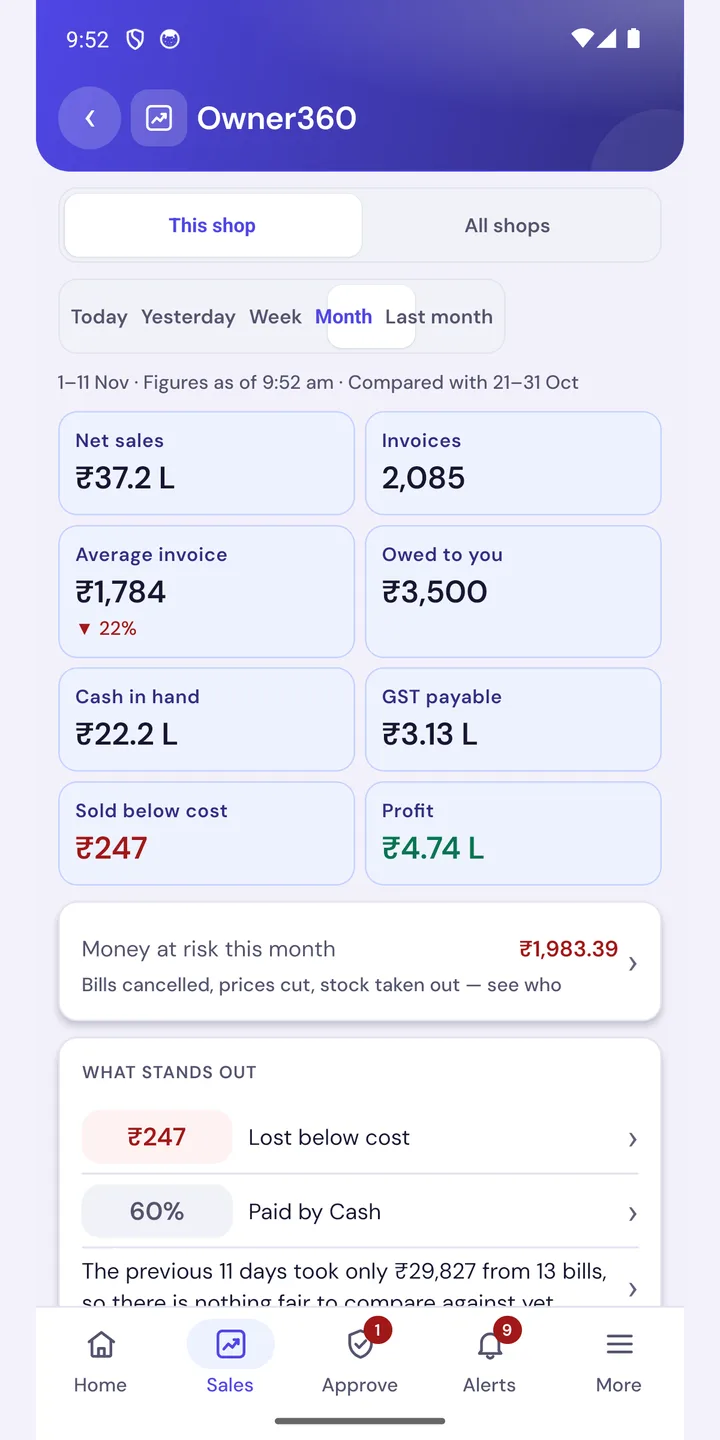
Talvera Pulse Owner360 screen: net sales, invoices, cash in hand, GST payable, profit and money at risk

Owner360

Every number you check at closing time, in one screen

Pick This shop or All shops, then Today, Yesterday, Week, Month or Last month. Each figure is compared with the period before it.

  • Net sales, invoices and average invoice
  • Cash in hand, money owed to you and GST payable
  • Profit, and what was sold below cost
  • Money at risk: bills cancelled, prices cut, stock taken out — see who
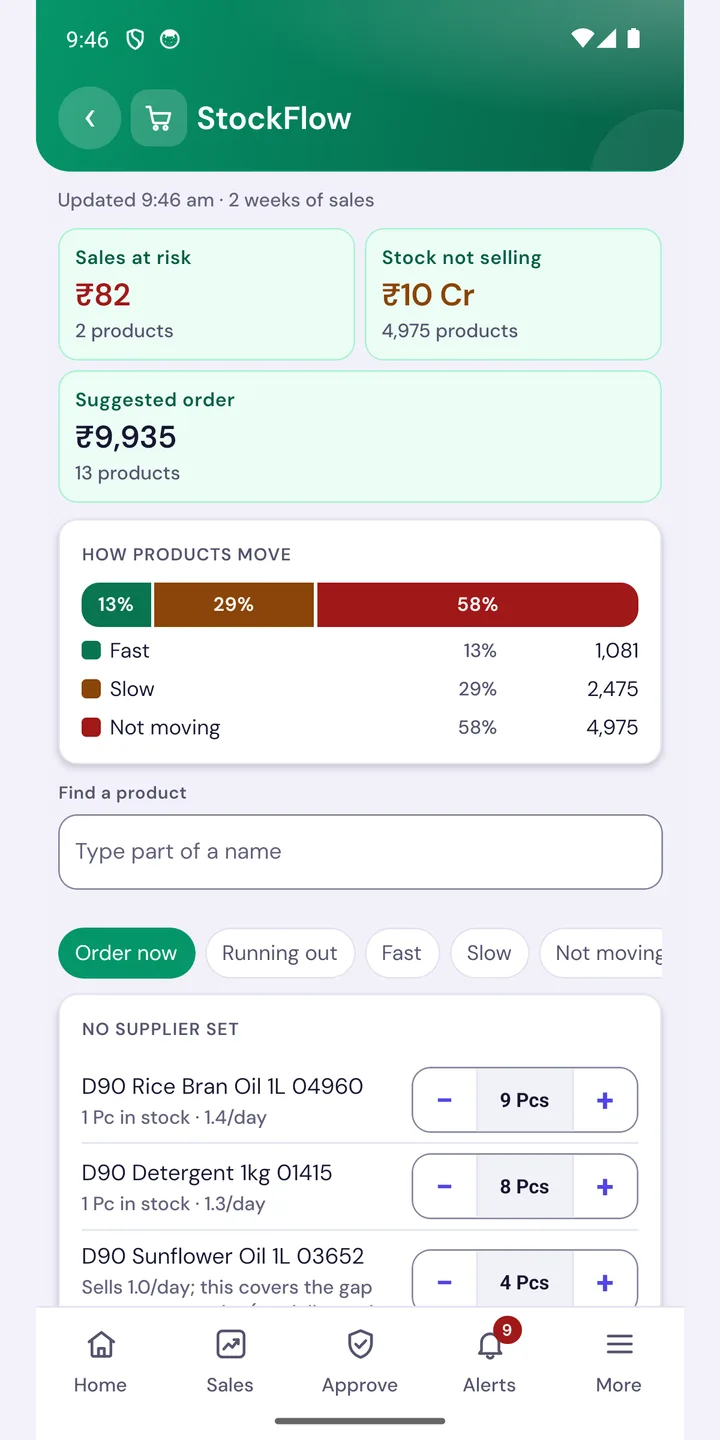
Talvera Pulse StockFlow screen: sales at risk, stock not selling, suggested order and fast, slow and not-moving products

StockFlow

Know what to order before the shelf goes empty

StockFlow reads two weeks of sales and tells you what is about to run out, what is not moving, and how much to order.

  • Sales at risk from items running out
  • Stock not selling, with the rupees locked in it
  • Fast, slow and not-moving split of your range
  • Adjust the suggested quantity and raise a draft purchase order
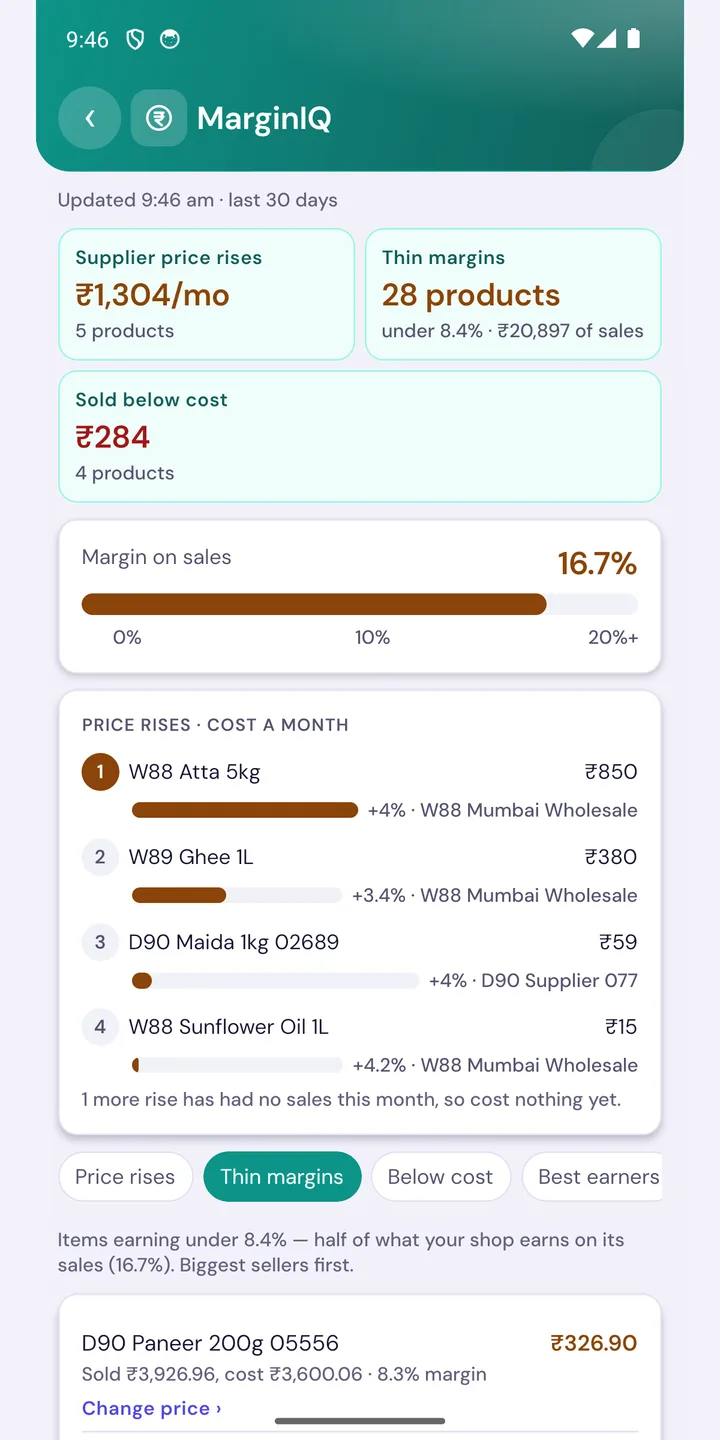
Talvera Pulse MarginIQ screen: supplier price rises, thin margins, items sold below cost and margin on sales

MarginIQ

Catch the items quietly eating your profit

See where a supplier raised a price and what it costs you every month, which items earn too little, and what sold below cost.

  • Supplier price rises ranked by rupees lost a month
  • Thin-margin items, biggest sellers first
  • Items sold below cost
  • Change price straight from the list
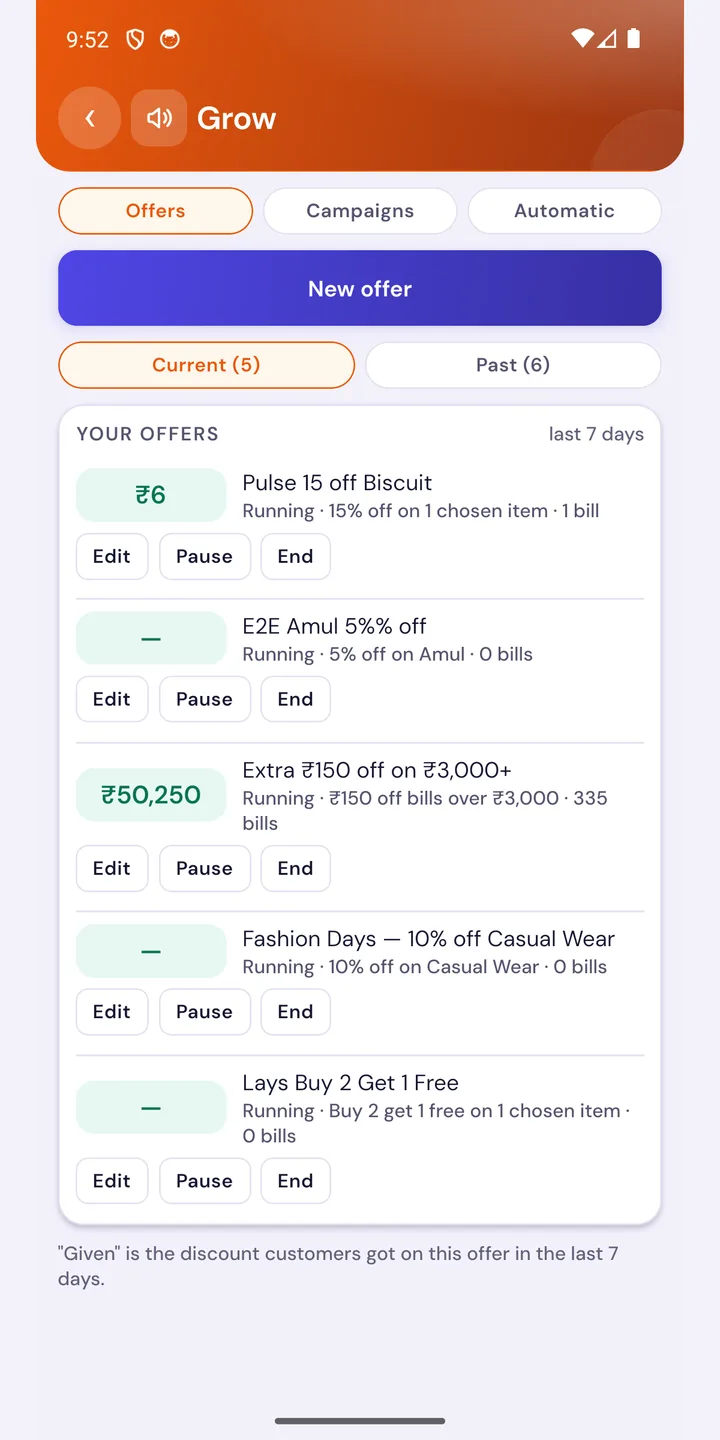
Talvera Pulse Grow screen: running offers with edit, pause and end buttons and the discount given on each

Grow

Run offers from your phone and see what they cost

Create an offer, then watch how many bills used it and how much discount customers got. Edit, pause or end it any time.

  • Percentage, buy-more-get-free and bill-value offers
  • Discount given and bills per offer, last 7 days
  • Campaigns and automatic WhatsApp messages in the same place
  • The same checks as the counter
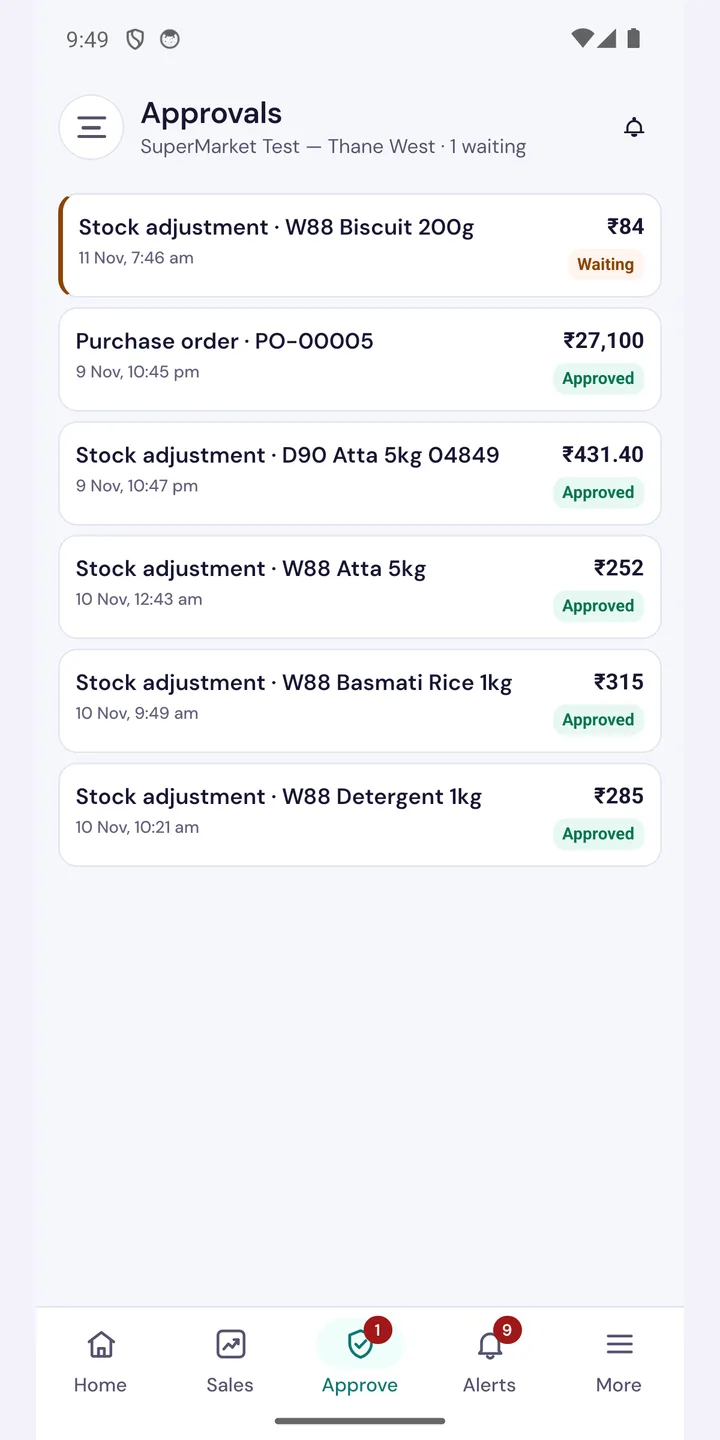
Talvera Pulse Approvals screen: a stock adjustment waiting and earlier purchase orders and adjustments approved

Approvals

Say yes from anywhere — Orbit finishes the job

When your manager needs a purchase order or a stock adjustment approved, it waits for you here. Approve it and the counter completes it.

  • A badge shows how many are waiting
  • Amount and date on every request
  • A trail of what was approved
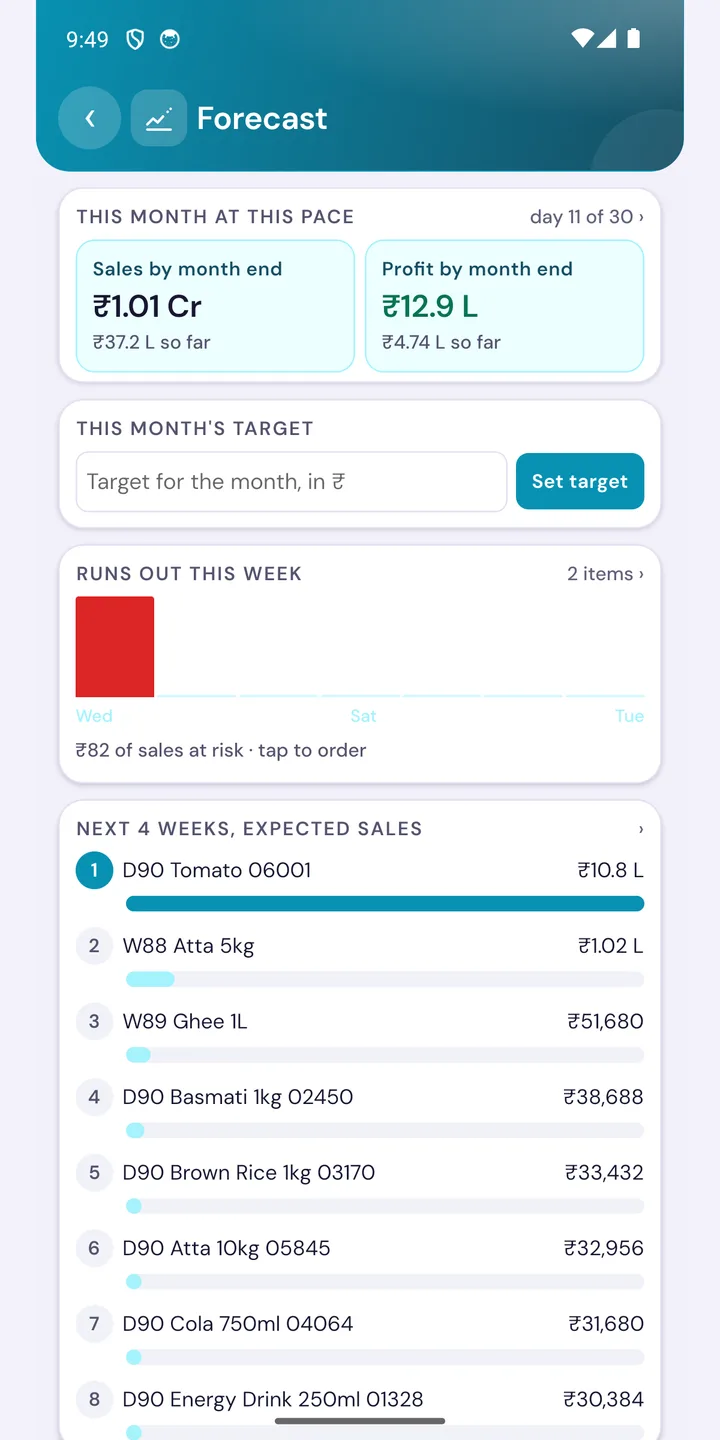
Talvera Pulse Forecast screen: sales and profit by month end, monthly target, items running out this week and expected sales

Forecast

See where the month will end, while you can still change it

At this pace, how much will you sell and earn by month end? Set a target, and see which items run out this week.

  • Sales and profit by month end
  • A monthly target you set in rupees
  • Items that run out this week, tap to order
  • Expected sales by product for the next 4 weeks
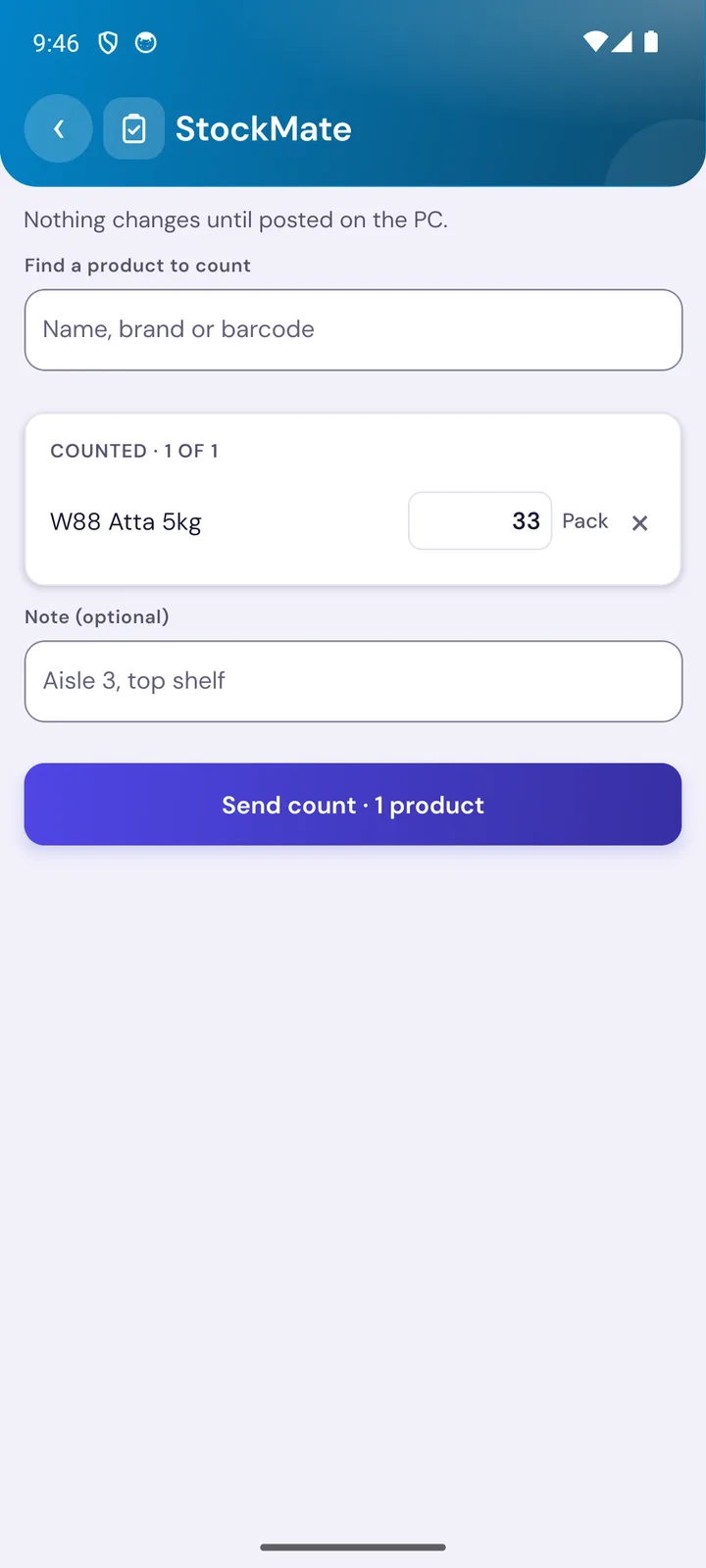
Talvera Pulse StockMate screen: counting a product by name or barcode and sending the count to the PC

StockMate

Count the shelf on your phone

Find a product by name, brand or barcode, type what is on the shelf and send the count. Nothing changes in stock until it is posted on the PC.

  • Search by name, brand or barcode
  • Add a note such as aisle or shelf
  • Safe: stock changes only when you post the count

And everything else

Twelve tools, one app

Figures come from your own counter PC’s books, so what you see on the phone is what the shop has.

Today’s business

Sales, cash and profit — every shop

Today, this week and this month for each shop you own. Figures that add up, with plain-word changes against yesterday and last month.

StockFlow

What to order

What is about to run out, what is not moving, and the supplier order that fixes it. Raise a draft purchase order from the phone; it lands on your counter PC.

MarginIQ

Profit check

Items selling thin or below cost, and supplier price rises, with the rupees they cost you each month.

StockMate

Count stock on the phone

Count the shelf on your phone. Nothing in stock changes until you post the count.

CashWatch

Cash and dues

Cash in hand, who owes you, what you owe, and where cash went.

StaffPulse

Staff and leaks

Cancelled bills, price cuts and stock taken out, by person.

CustomerLens

Know your customers

Loyal, slipping away and stopped coming — with a call or WhatsApp for each.

Grow sales

Offers and WhatsApp campaigns

Make offers and send WhatsApp campaigns from your phone, with the same checks as the counter.

Approvals

Approve from anywhere

Approve what your manager is waiting on — a purchase order, a stock adjustment — and Orbit finishes the job.

Ask Pulse

Ask in Hindi or English

“कल कितनी बिक्री हुई?” Answers come only from your shop’s own figures.

InvoiceScan

Scan supplier bills

Photograph a supplier’s bill and it goes to your PC to check.

Alerts and widget

Know when it needs you

A home-screen widget shows today’s sales at a glance, and alerts tell you when something needs you.

Get started in three steps

  1. 1

    Get Talvera Orbit

    Pulse is an add-on to Orbit. Start the free trial or ask us for the Pulse add-on on your licence.

  2. 2

    Install Pulse

    Get Talvera Pulse from Google Play on your Android phone.

  3. 3

    Sign in

    Use your mobile number and a one-time code. Your shops appear at once.

Questions owners ask

What is Talvera Pulse?

Talvera Pulse is the owner’s Android app for Talvera Orbit billing. It shows how each of your shops is doing — sales, cash, stock, profit, dues — without you being at the counter, and lets you act on it: raise a purchase order, send an offer, approve a request.

Do I need Talvera Orbit to use Pulse?

Yes. Pulse is an add-on to Talvera Orbit, for the owner. It needs an Orbit licence with the Pulse add-on, and you sign in with your mobile number and a one-time code. It does not bill; billing stays on the counter.

Is Talvera Pulse free?

The app is free to install from Google Play. The Orbit licence and the Pulse add-on are bought from Talvera, not inside the app. See the pricing page or contact us for a quote.

Can I see more than one shop?

Yes. Pulse shows sales, cash and profit for every shop on your licence, for today, this week and this month.

Can I ask questions in Hindi?

Yes. Ask Pulse answers in Hindi or English, for example “कल कितनी बिक्री हुई?”. Answers come only from your own shop’s figures.

Is it available for iPhone?

Not at the moment. Talvera Pulse is on Google Play for Android phones.

Does stock change when I count on the phone?

No. Nothing in stock changes until you post the count.

Stop guessing how the shop is doing

Install Talvera Pulse and see today’s business before you finish your tea.

Pulse is an add-on to Talvera Orbit and does not bill. See our privacy policy.