The desk between your principals and every shop you supply
Dealers and credit, price lists and schemes, beats, bill-wise receivables, warehouses and dispatch, GST and e-invoicing — on a Windows desktop that keeps working when the internet does not.
Watch the distributor tourRun a shop that sells to customers? Orbit for shops →Make what you sell? Orbit for manufacturers →
Distributor tour
See Orbit run a distribution business
What you get
Everything a distributor runs on
A distributor licence is everything a shop gets, plus the distribution modules.
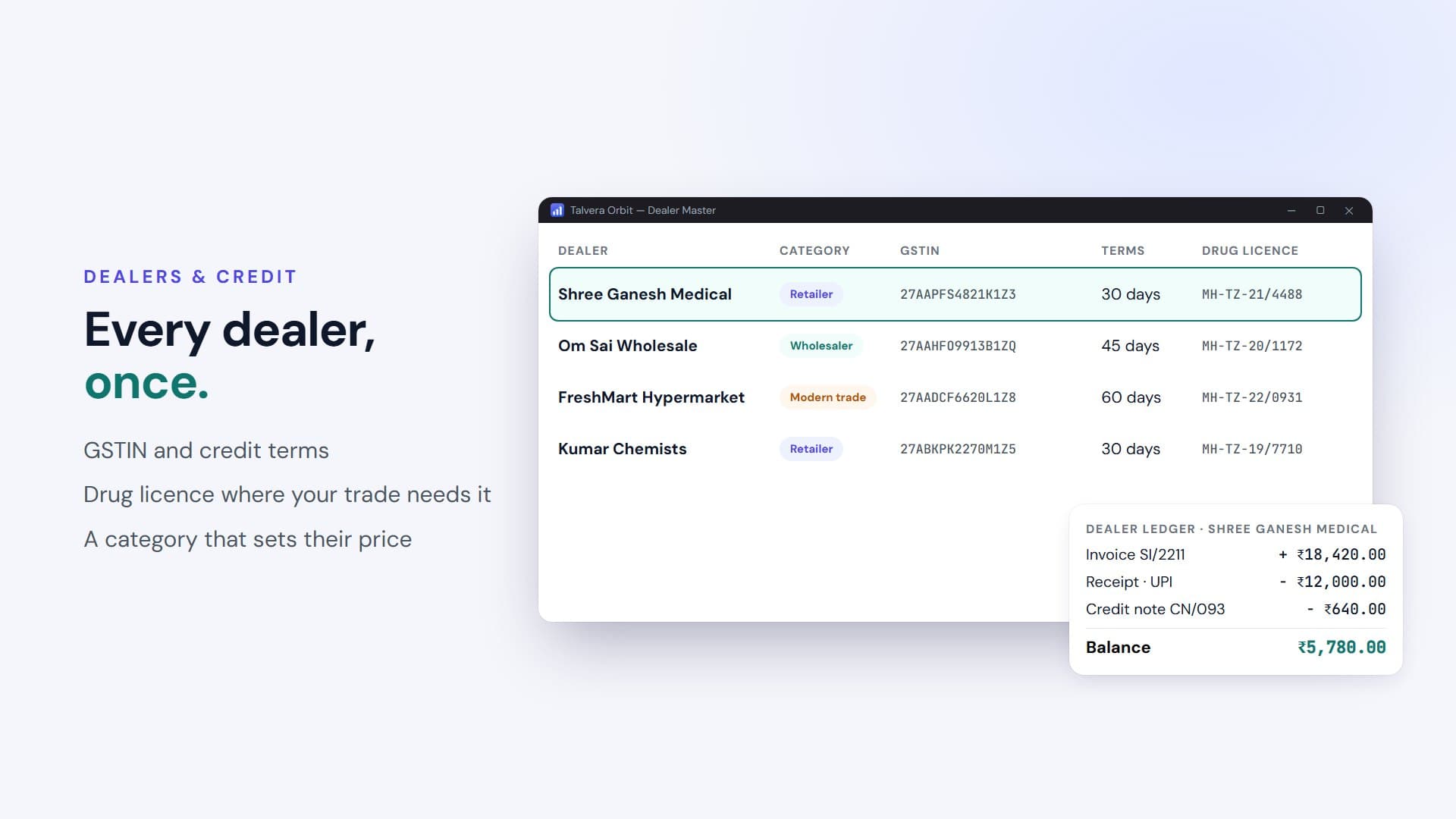
Dealers & Credit
Dealer master with GSTIN and credit terms, dealer ledger, dealer categories, and cheque tracking until a cheque clears.
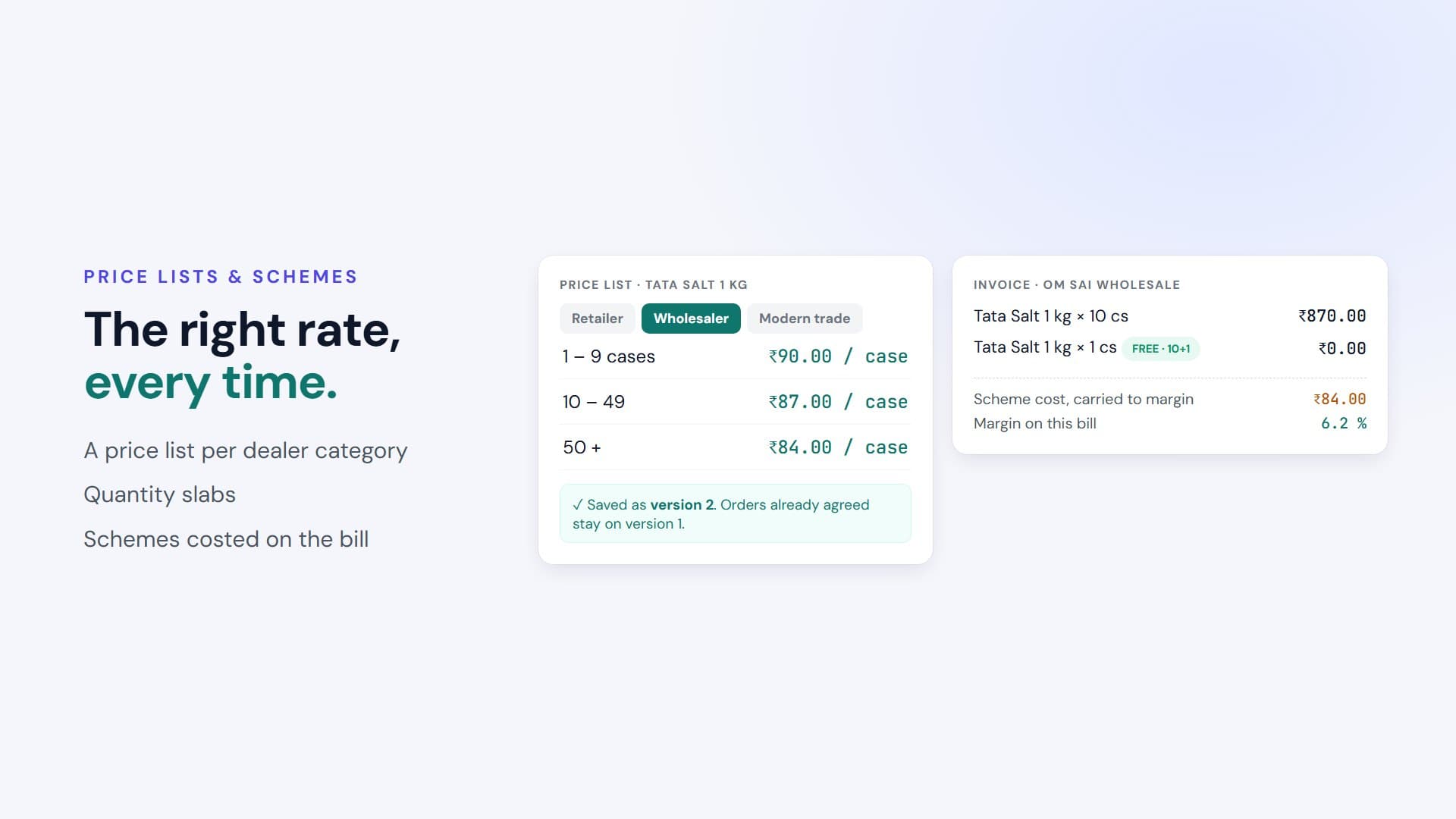
Price Lists & Schemes
Price lists and quantity slabs by dealer category, versioned on change so agreed orders are never repriced. Schemes with costed free goods.
Beats & Routes
The rounds your salesmen walk, with outlets in call order and what each one owes beside it.
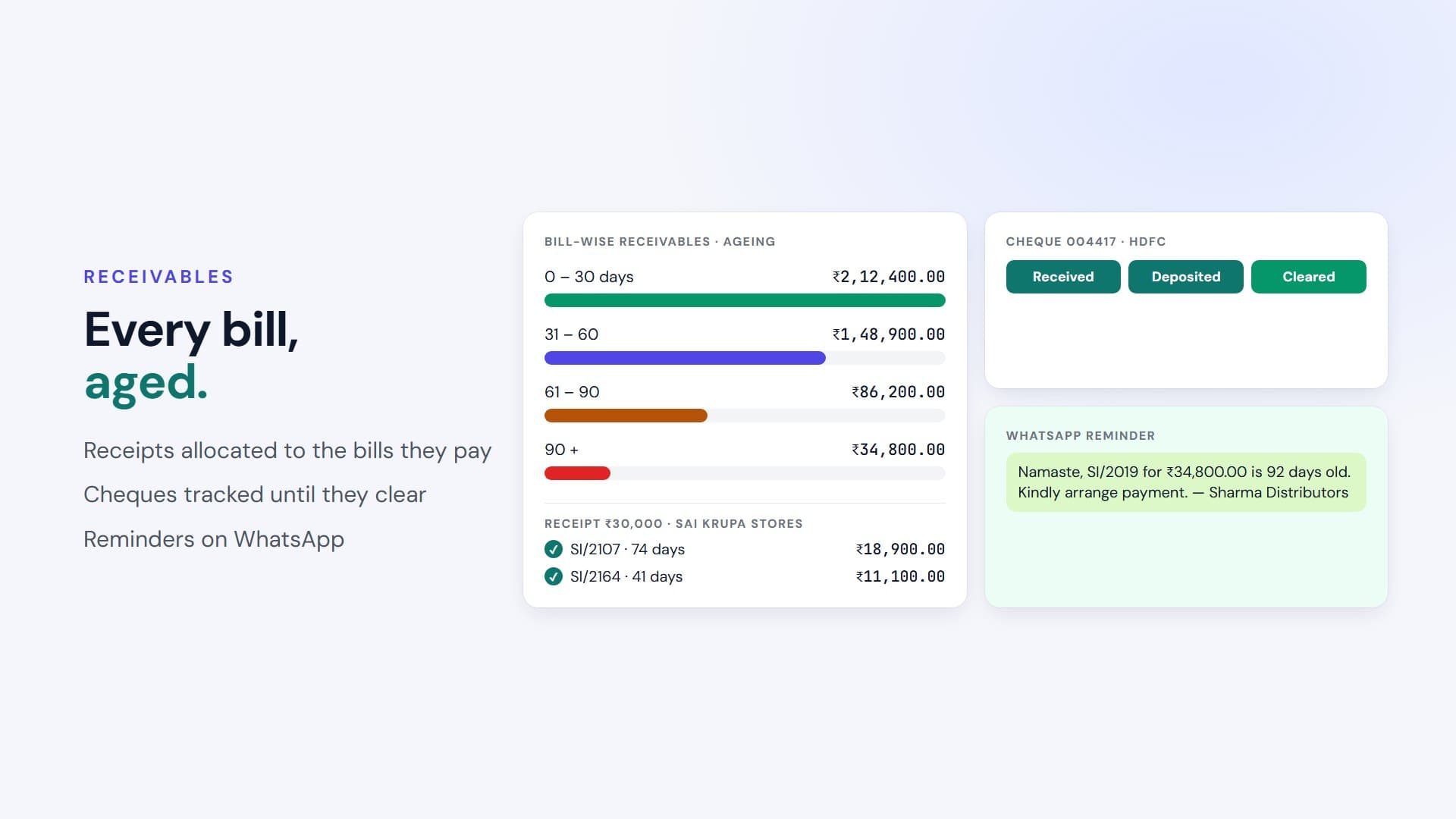
Bill-wise Receivables
Ageing buckets, receipt allocation against the bills it pays, and WhatsApp reminders — the report a distributor opens first every morning.
Orders, Pick & Pack, Dispatch
Orders and quotations become invoices without re-entry, through a pick-and-pack worklist to dispatch.
Warehouses & Transfers
Stock per warehouse, transfers with a document on every move, physical count, and godowns that issue to your branches.
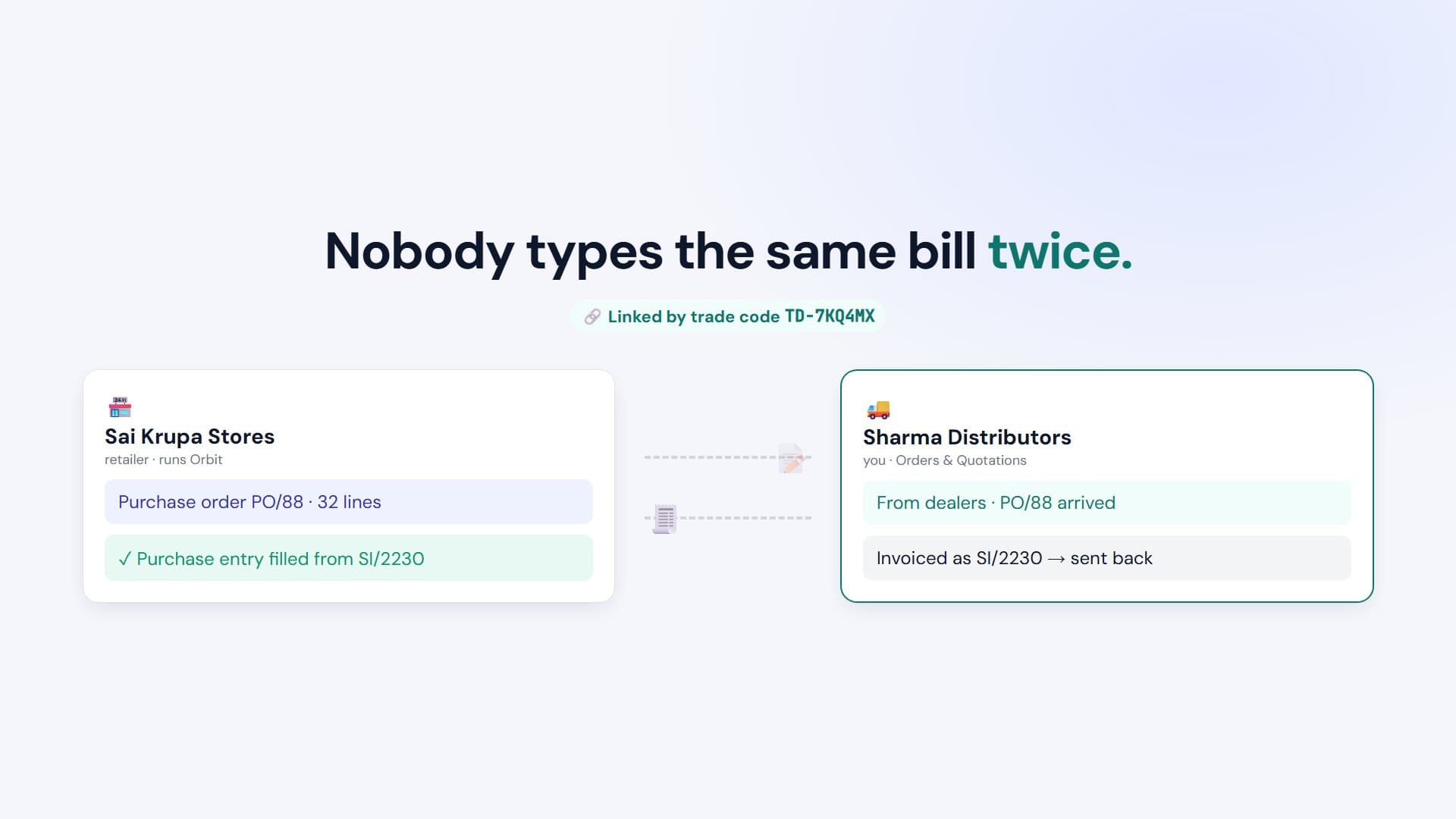
Trading Partners
Link with retailers who run Orbit: their purchase order arrives as your order, and your invoice arrives as their purchase entry.
GST, e-Invoice & e-Way
GSTR-1 / 3B, GST reconciliation and HSN summary, with IRN and e-way bill numbers tracked on every invoice.
Inside the app
The screens your team works in
Trading partners
Your dealers’ orders, straight onto your screen
When a retailer you supply runs Orbit too, the two of you can link — and stop typing each other’s bills.
- 1
Share your trade code
Give a retailer your TD- trade code. They enter it and you accept the link — there is no public directory of distributors or their dealers.
- 2
Their order arrives
The retailer raises a purchase order from your published catalogue, and it lands on your Orders screen as a dealer order.
- 3
Your invoice lands as their purchase
Invoice it as usual. It arrives in their purchase entry, ready to receive against — no retyping at either end.
By trade
Set up for what you distribute
Your licence says what you trade in, and Orbit brings the fields that trade needs — batch and expiry for pharma, IMEI for electronics, sizes and colours for apparel.
Pharma Distributor
Software for Pharma Distributors & Stockists
See how it works →FMCG Distributor
Software for FMCG & Grocery Distributors
See how it works →Wholesale Distributor
Software for Wholesale & Multi-brand Distributors
See how it works →Electronics Distributor
Software for Electronics & Appliance Distributors
See how it works →Apparel & Textile Distributor
Software for Apparel & Textile Distributors
See how it works →Hardware & Building Materials Distributor
Software for Hardware & Building Material Distributors
See how it works →Stationery & Books Distributor
Software for Stationery & Book Distributors
See how it works →Distribute something else?
Tell us what — we will show you how it is set up.
Talk to us →One app, the licence decides
🏪 Shop licence
Counter billing, stock, customers and loyalty, GST, reports — for a business that sells to the public.
Orbit for shops →🚚 Distributor licence
Everything a shop has, plus dealers, price lists, schemes, beats, receivables and trading partners — for a business that sells on to shops.
🏭 Manufacturer licence
Everything a shop has, plus bills of material, work orders, job work, quality and job costing — for a business that makes what it sells.
Orbit for manufacturers →Distributors ask us
How is Orbit for Distributors different from your shop billing software?
It is the same Orbit desktop app, switched into distribution by your licence key. A distributor licence adds dealer master and ledger, dealer categories, price lists and slabs, schemes and free goods, beats and routes, bill-wise receivables and trading-partner links — on top of everything a shop already has, so counter sales keep working too.
What is a trading-partner link?
A consent both sides give. Once a retailer who runs Orbit links with you using your trade code, their purchase order arrives on your Orders screen and your invoice arrives in their purchase entry — no retyping at either end. Either side can suspend or end the link at any time.
Does it work without internet?
Yes. Orbit is a Windows desktop app that keeps your distribution data in a database on your own PC, so invoicing, stock, dealer ledgers and reports keep working with no internet at all. Trading-partner documents queue up and go out when the connection returns.
Is there a free trial for distributors?
Yes — a 14-day trial of the full distributor app on one Windows PC, no credit card needed. Or book a demo and we will walk through it with your own dealers and products.
How is it priced?
Distribution is quoted per business rather than sold off a price list, because it depends on how many users, warehouses and branches you run. Book a demo and we will send a written quote for your distribution business.
Can I sell to retailers who do not use Orbit?
Of course. Every dealer gets a normal GST invoice, printed or shared as a PDF. Retailers who do run Orbit can also link with you, so their orders arrive on your screen and your invoices land in their purchase entry.
See it with your own dealers and products
Book a demo and we will walk through Orbit on your data, then send a written quote.